Property manager guides
Developers: API keys, webhooks and MCP
Create API keys for the REST API, send webhooks to your systems and connect an AI assistant such as Claude through MCP.
- Updated
- Reading time
- 1 min read
The Developers tab lets workspace owners and admins connect other software to Propvora. API keys, webhooks and the MCP server are available on every plan. Full reference documentation is on the developer documentation page.
The Developers tab
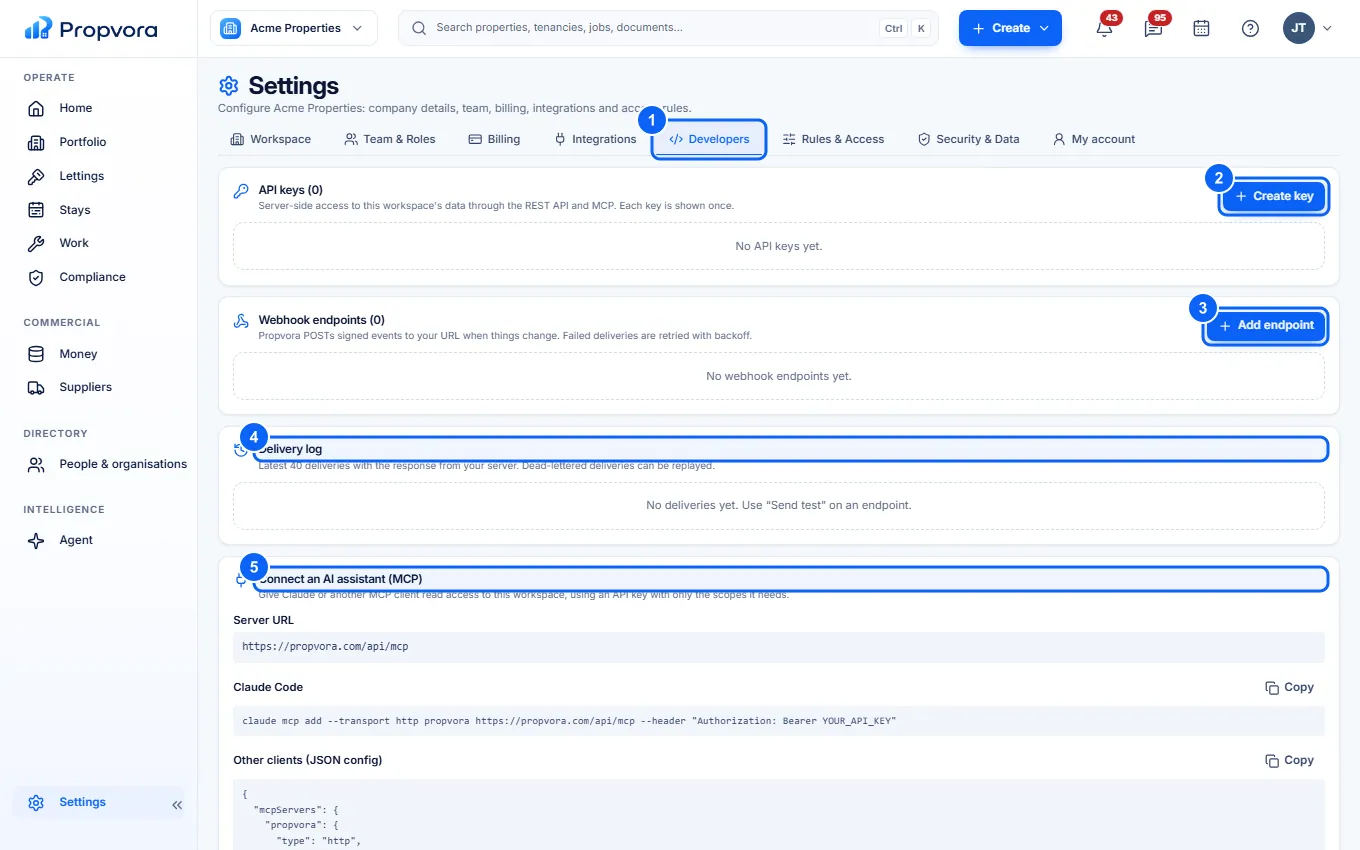 (opens the full-size screenshot)
- Open Settings › Developers. You may be asked to confirm it is you.
- Create key: give the key a Name, choose its Scopes (only what it needs) and when it Expires. The key is shown once; store it safely. Use Revoke to switch a key off at once.
- Add endpoint: add a URL that receives webhook events. Each endpoint has a signing secret you can rotate; use Send test to check it.
- Delivery log: every webhook delivery and its result.
- Connect an AI assistant (MCP): the server URL and ready-made setup for Claude Code and other MCP clients.
How MCP access works
- Reading is limited to the scopes of the API key you use, and revoking the key disconnects the assistant at once.
- Anything that changes data, such as creating a work order, only files an approval request. A workspace member approves it in the Agent.
- Records contain text written by other people. Assistants are told to treat it as data, but review what your assistant does with it.