Supplier guides
Requests and quotes
Work through new requests, send quotes and track each request from New to Won or Lost.
- Updated
- Reading time
- 1 min read
Requests holds every job request sent to you: direct requests from customers and property managers, and marketplace jobs that match your services and area. You reply with a quote, and a won quote becomes a job.
On the Free plan you can place 10 bids a month; Pro and above are unlimited.
Work through your requests
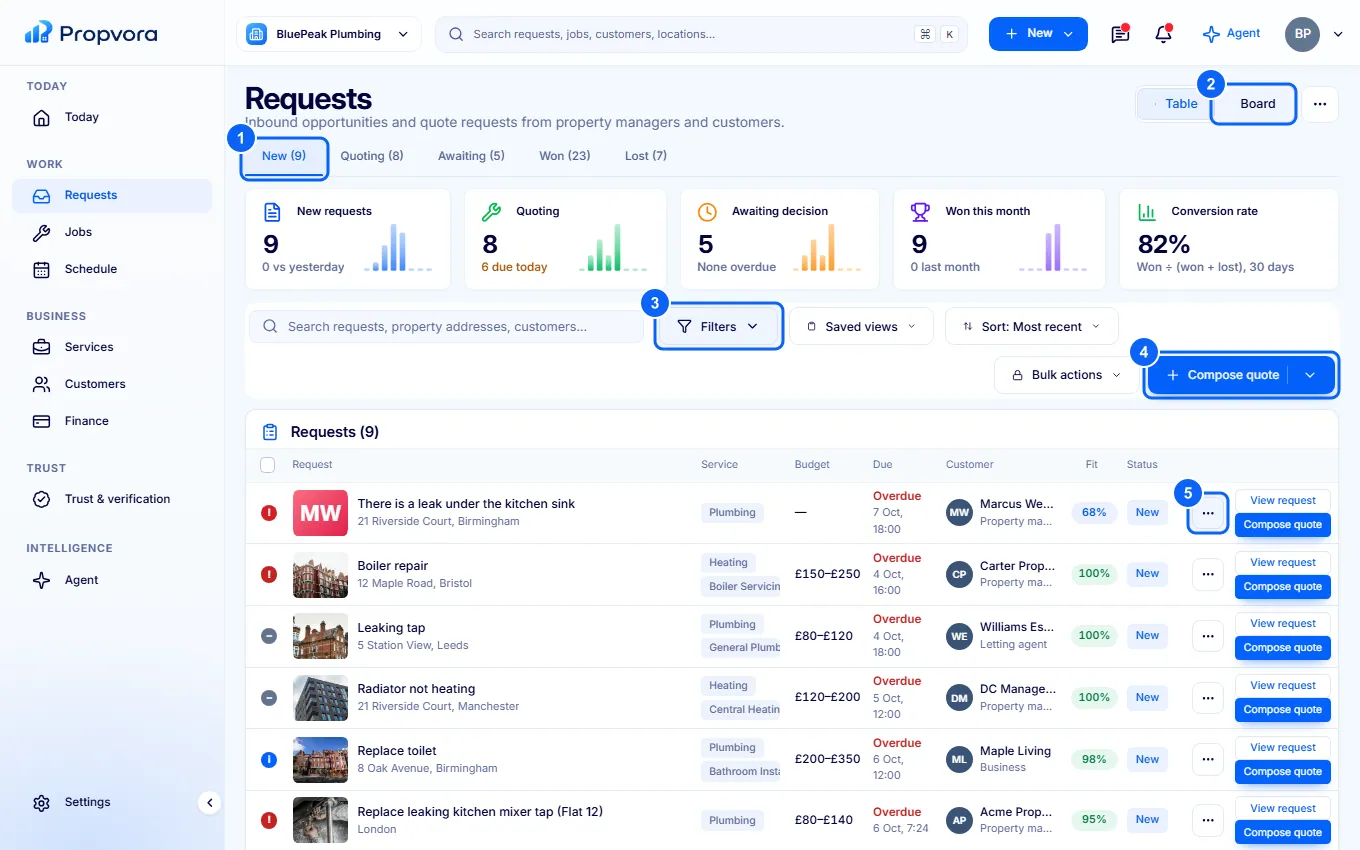 (opens the full-size screenshot)
- Status tabs: New, Quoting, Awaiting (quote sent, waiting for the customer), Won and Lost.
- Switch between Table and Board views.
- Filters, Saved views and Sort by narrow the list, for example to one area or service.
- Compose quote: write a quote for a request.
- The actions menu on each request: open it, quote, ask a question or decline.
Send a quote
- Open the request and read the scope, photos, location and timing.
- Choose Compose quote, add the price, what is included and when you can attend.
- Send it. The request moves to Awaiting until the customer accepts or declines.
Your quote shows the customer your price. Propvora's commission is deducted from your payout, not added to the customer's price, and you see your expected earnings before you send.