Guests, renters and customers
Your trips and rentals
See upcoming and past stays, rentals and service orders in one place, with receipts and quick actions.
- Updated
- Reading time
- 1 min read
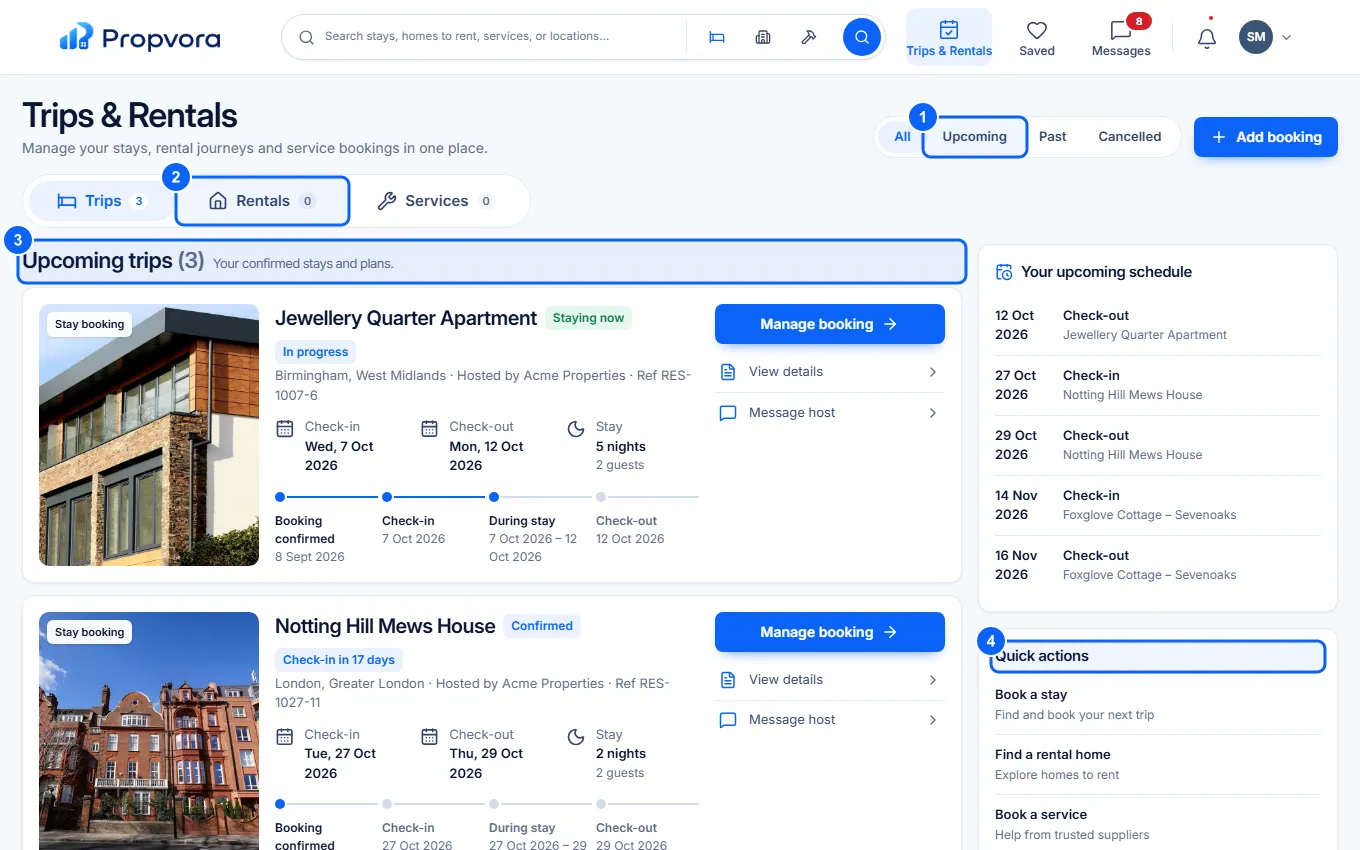
Trips & Rentals lists everything you have booked or applied for through Propvora.
 (opens the full-size screenshot)
- All, Upcoming, Past and Cancelled: filter by date.
- Trips, Rentals and Services: filter by type.
- Upcoming trips: your confirmed stays. Select one for the address, check-in details, payment and receipt.
- Quick actions: message your host, see payments and more.
Your payments and receipts are also under Payments (Due, Paid, and Deposits / Refunds). To cancel, open the trip and follow the cancellation option; the policy shown when you booked applies. See Cancelling a marketplace order.
If you rent a home through a landlord or agent who uses Propvora, they may also invite you to a tenant portal for repairs, rent and documents.